Unbaking the Cake
Capturing Data Before Entropy
The GenAI industry spends billions trying to reverse-engineer structure from documents. But data is born structured — it only becomes “unstructured” when we compress it for human consumption. The solution isn’t better RAG. It’s better capture at the source.
Content by: Dinis Cruz — Licensed under Creative Commons Attribution 4.0 International (CC BY 4.0). Based on a LinkedIn post by Timothy Cook.
The argument reframes the GenAI industry’s obsession with unstructured data processing as treating a symptom rather than the cause. Instead of building better tools to “unbake the cake” (reverse-engineer structure from documents), we should prevent data entropy in the first place by capturing meaning at the source.
Key Concepts
Data Entropy
The loss of structure, lineage, metadata, and semantic context when structured data is compressed into documents for human consumption — an irreversible information loss that the industry then tries to reverse.
The Unbaking Fallacy
The idea that we can reliably reconstruct the original structured data from documents is fundamentally flawed — like trying to unbake a cake back into flour, eggs, and sugar.
Native Semantic Capture
Capturing data at its source in its native, semantic state before flattening it into documents — preserving the meaning at the point of creation rather than hallucinating context later.
RAG as Expensive Glue
Retrieval-Augmented Generation pipelines are costly remediation for a self-inflicted problem — breaking data then buying expensive tools to partially fix it.
Structure Reconstruction Cost
The billions spent on vector databases, ingestion engines, and LLM inference to “guess” structure that existed before document creation — a massive industry built on reversing preventable entropy.
The Document Compression Problem
The practice of force-compressing rich, structured data into formats like PDFs and slide decks solely for human readability, destroying machine-usable structure in the process.
Key Quotes
Visual Resources
Infographic
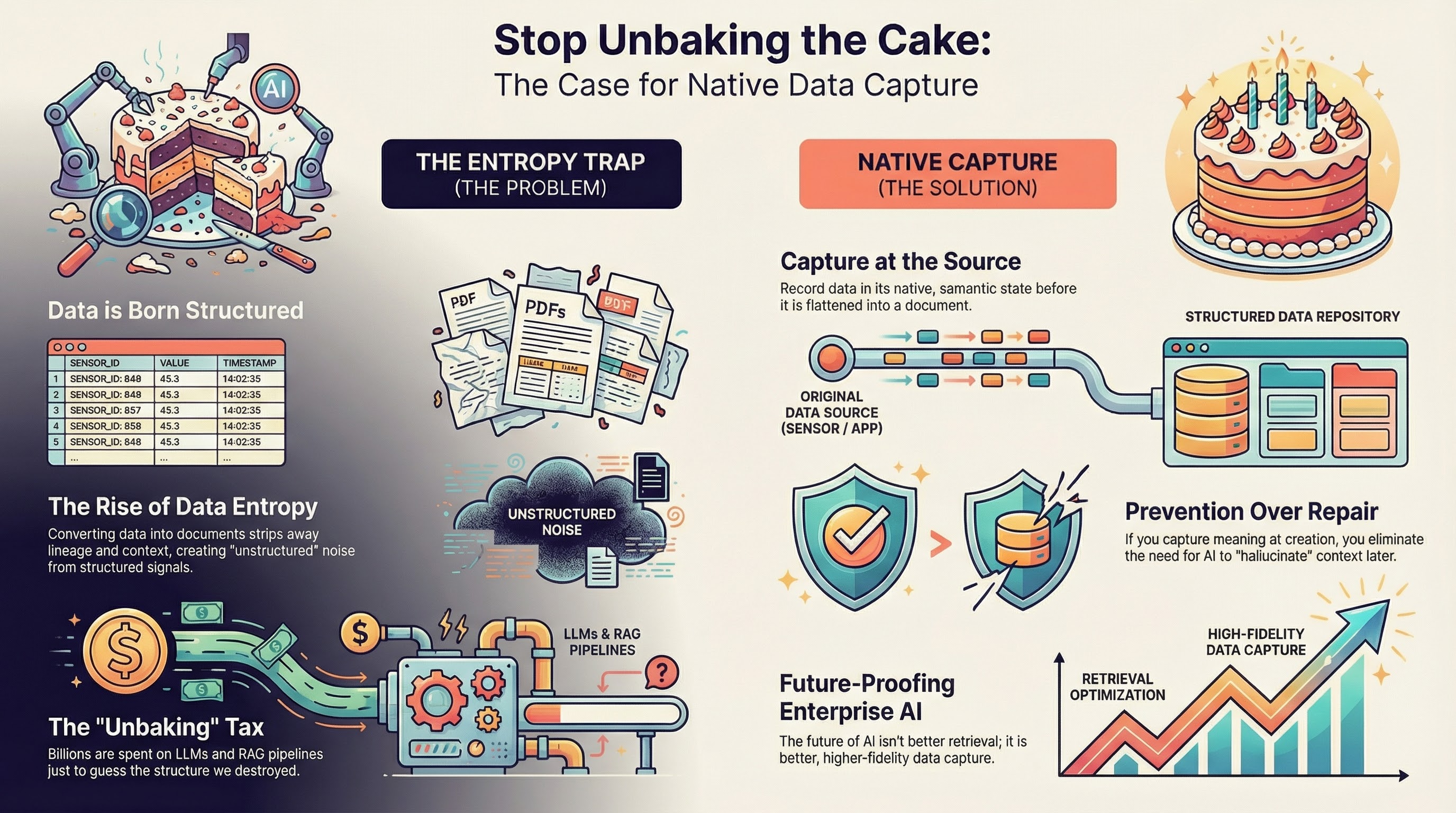
Click to view full size
Deep Dive Slide Deck (14 slides)
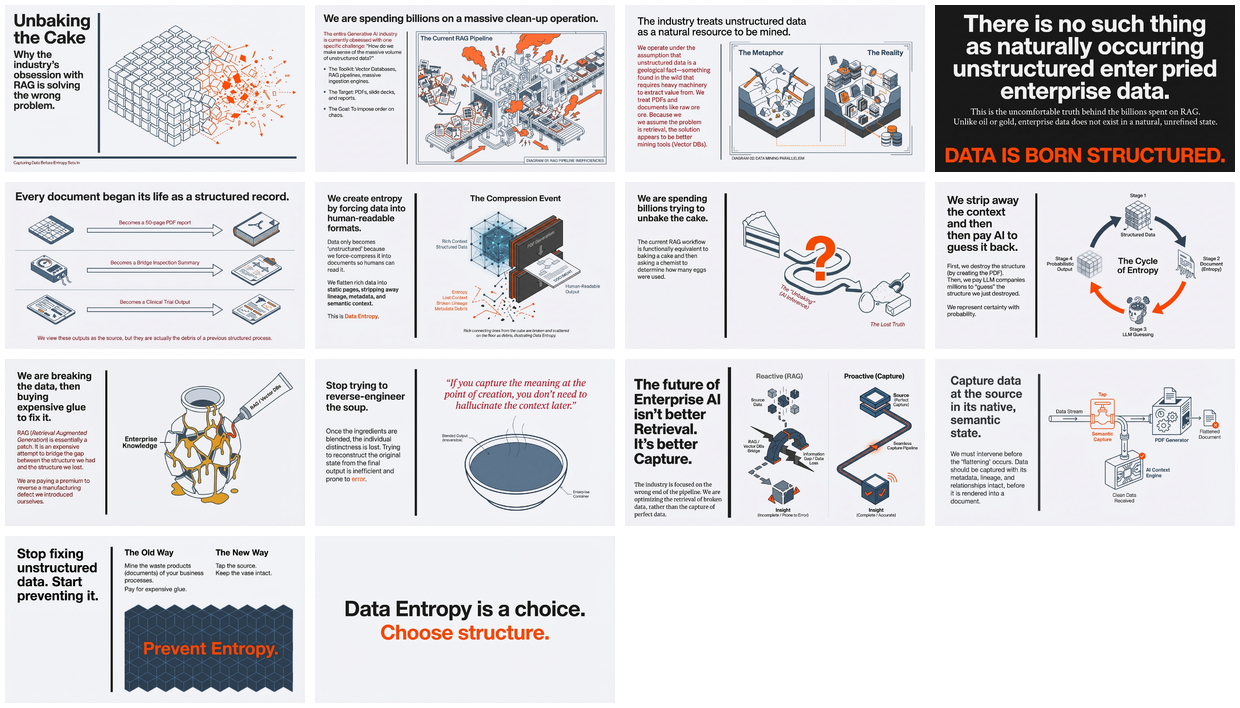
Click to open PDF
Semantic Knowledge Graph
Machine-readable metadata for search, discovery, and graph database integration.
The Core Problem
flowchart LR
    subgraph origin ["DATA ORIGIN (Structured)"]
        DB[(Database Rows)]
        SENSOR[Sensor Data]
        FORM[Form Entries]
        API[API Responses]
    end

    subgraph compression ["COMPRESSION (Entropy)"]
        PDF[PDF Reports]
        SLIDES[Slide Decks]
        DOCS[Documents]
    end

    subgraph loss ["INFORMATION LOSS"]
        META[Metadata Lost]
        LINEAGE[Lineage Lost]
        CONTEXT[Context Lost]
    end

    subgraph recovery ["EXPENSIVE RECOVERY"]
        VECTOR[(Vector DBs)]
        RAG[RAG Pipelines]
        LLM[LLM Guessing]
    end

    DB --> PDF
    SENSOR --> PDF
    FORM --> SLIDES
    API --> DOCS

    PDF --> META
    SLIDES --> LINEAGE
    DOCS --> CONTEXT

    META --> VECTOR
    LINEAGE --> RAG
    CONTEXT --> LLM

    style origin fill:#c8e6c9,stroke:#2e7d32
    style compression fill:#fff3e0,stroke:#ef6c00
    style loss fill:#ffcdd2,stroke:#c62828
    style recovery fill:#e1bee7,stroke:#7b1fa2
The Solution
flowchart LR
    subgraph origin ["DATA ORIGIN"]
        DB[(Database)]
        SENSOR[Sensors]
        FORM[Forms]
    end

    subgraph capture ["NATIVE CAPTURE"]
        SKG[("Semantic\nKnowledge\nGraph")]
    end

    subgraph benefits ["PRESERVED"]
        META["Metadata"]
        LINEAGE["Lineage"]
        CONTEXT["Context"]
        STRUCTURE["Structure"]
    end

    DB --> SKG
    SENSOR --> SKG
    FORM --> SKG

    SKG --> META
    SKG --> LINEAGE
    SKG --> CONTEXT
    SKG --> STRUCTURE

    style origin fill:#c8e6c9,stroke:#2e7d32
    style capture fill:#bbdefb,stroke:#1565c0
    style benefits fill:#c8e6c9,stroke:#2e7d32
Knowledge Graph
graph TB
    subgraph artifacts ["Artifacts"]
        STRUCTURED[("Structured Data\n(artifact)")]
        UNSTRUCTURED[("Unstructured Data\n(artifact)")]
    end

    subgraph problems ["Problems"]
        ENTROPY["Data Entropy\n(problem)"]
        COMPRESSION["Document Compression\n(problem)"]
    end

    subgraph tech ["Technology"]
        RAG["RAG Pipeline\n(technology)"]
        VECTOR["Vector Database\n(technology)"]
    end

    subgraph solutions ["Solutions"]
        CAPTURE["Native Semantic Capture\n(solution)"]
    end

    COMPRESSION -->|causes| ENTROPY
    ENTROPY -->|transforms| UNSTRUCTURED
    STRUCTURED -->|transformed_from| UNSTRUCTURED
    RAG -->|remedies| UNSTRUCTURED
    VECTOR -->|remedies| UNSTRUCTURED
    CAPTURE -->|prevents| ENTROPY
    CAPTURE -->|preserves| STRUCTURED

    style STRUCTURED fill:#c8e6c9,stroke:#2e7d32
    style UNSTRUCTURED fill:#ffcdd2,stroke:#c62828
    style ENTROPY fill:#fff3e0,stroke:#ef6c00
    style COMPRESSION fill:#fff3e0,stroke:#ef6c00
    style RAG fill:#e1bee7,stroke:#7b1fa2
    style VECTOR fill:#e1bee7,stroke:#7b1fa2
    style CAPTURE fill:#bbdefb,stroke:#1565c0
Taxonomy
data_entropy_thesis
├── problems
│   ├── data_entropy
│   ├── structure_loss
│   ├── metadata_stripping
│   └── context_destruction
├── current_approaches
│   ├── vector_databases
│   ├── rag_pipelines
│   ├── ingestion_engines
│   └── llm_structure_guessing
├── data_lifecycle
│   ├── structured_origin
│   │   ├── database_rows
│   │   ├── sensor_measurements
│   │   └── form_entries
│   ├── compression_step
│   │   ├── pdf_reports
│   │   ├── slide_decks
│   │   └── summary_documents
│   └── entropy_result
│       └── unstructured_data
└── proposed_solution
    ├── native_capture
    ├── source_preservation
    └── semantic_state_retention
Neo4j Graph Import
Import this knowledge graph into Neo4j to explore relationships interactively.
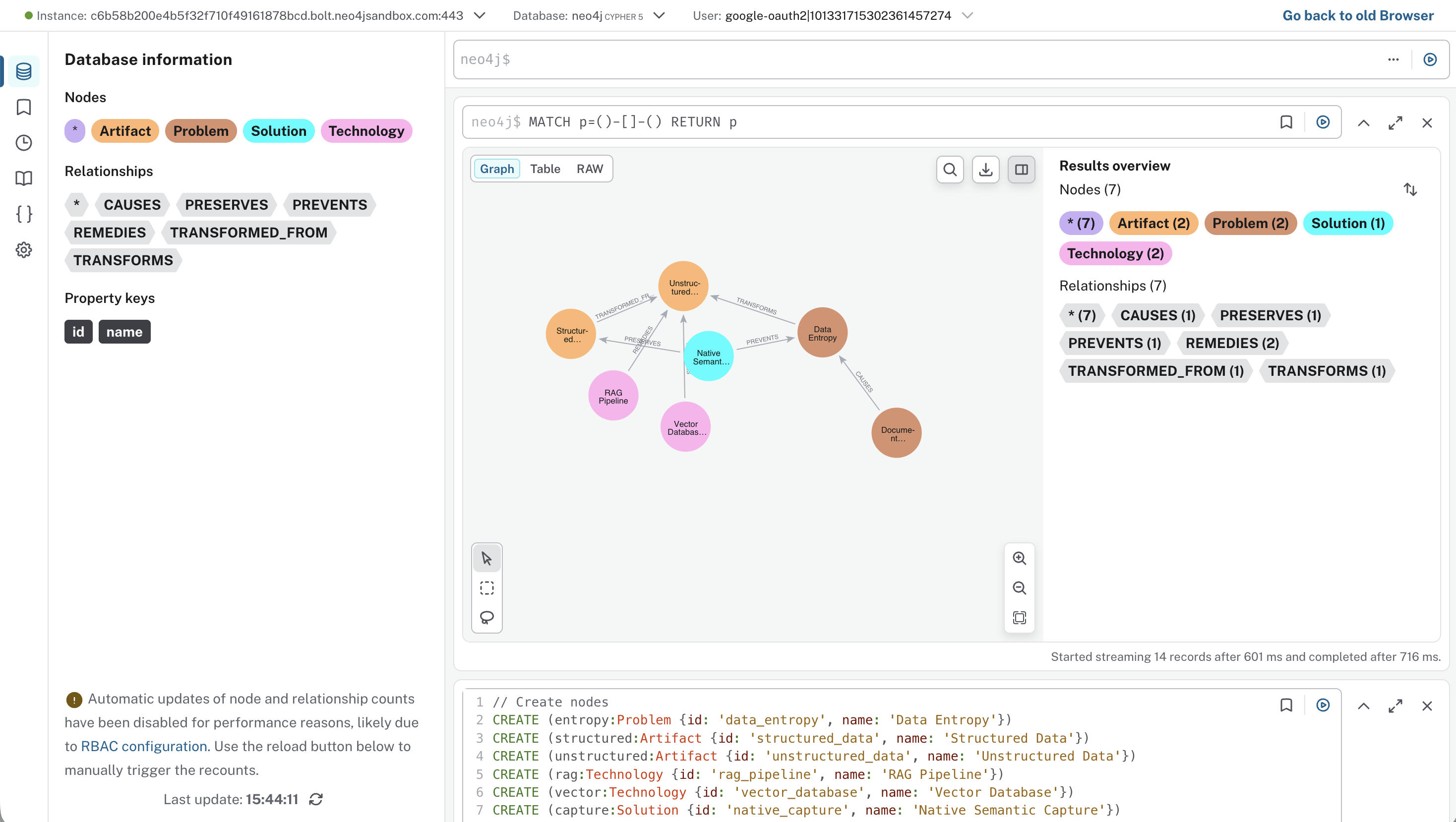
Visualization of this graph in Neo4j Browser
Cypher Import Script
// Create nodes
CREATE (entropy:Problem {id: 'data_entropy', name: 'Data Entropy'})
CREATE (structured:Artifact {id: 'structured_data', name: 'Structured Data'})
CREATE (unstructured:Artifact {id: 'unstructured_data', name: 'Unstructured Data'})
CREATE (rag:Technology {id: 'rag_pipeline', name: 'RAG Pipeline'})
CREATE (vector:Technology {id: 'vector_database', name: 'Vector Database'})
CREATE (capture:Solution {id: 'native_capture', name: 'Native Semantic Capture'})
CREATE (compression:Problem {id: 'document_compression', name: 'Document Compression'})

// Create relationships
CREATE (compression)-[:CAUSES]->(entropy)
CREATE (entropy)-[:TRANSFORMS]->(unstructured)
CREATE (rag)-[:REMEDIES]->(unstructured)
CREATE (vector)-[:REMEDIES]->(unstructured)
CREATE (capture)-[:PREVENTS]->(entropy)
CREATE (capture)-[:PRESERVES]->(structured)
CREATE (structured)-[:TRANSFORMED_FROM]->(unstructured)
How to use this in Neo4j
- Create a free Neo4j Sandbox at sandbox.neo4j.com — select “Blank Sandbox”
- Open Neo4j Browser and paste the Cypher code above into the query editor
- Run the query (click the play button or press Ctrl+Enter)
- Visualize the graph with:
MATCH p=()-[]-() RETURN p
Tags
Source Information
| Original Author | Timothy Cook |
| Original Post | |
| Content Created By | Dinis Cruz |
| License | CC BY 4.0 International |
| Generated With | Google NotebookLM |
| Date | January 2026 |
Continue Reading
Explore the expanded thesis in the companion piece covering Data Physics, the Prism metaphor, and Security via Simplicity.